
Domain Not Working After Purchase? 6 Reasons Your Website Isn’t Showing
November 23, 2026

If your site is hacked, save proof first, and then take the site offline, change all your passwords, contact your host for a clean backup, and then scan and clean the site. nce it’s clean, ask Google to remove the ‘hacked’ warning and add basic protection so it doesn’t happen again
Typically, it begins with an incoming phone call. A customer informs you that your website opened a betting app page. Or just before your holiday sale, your Google listing is showing up as “This site may be hacked”. The first thing you do is log in and begin to delete files.
Hold on for a minute. The most frequent error is deleting the very files the attacker used to access the system, because of panic. The site looks fine for a week, and then it’s hacked again through the same gap. Give it one calm hour and follow the steps below in order.
If you read only one part of this post, make it this one. Keep it open while you work.
| When |
What to do |
| First 10 minutes | Take screenshots of the hacked pages, the Google warning and any messages customers sent you. Note the time. |
| 10–20 minutes | Put the site in maintenance mode or ask your hosting provider to do it. |
| 20–40 minutes | Change your hosting, cPanel, FTP, database, website admin and email passwords. Use your own laptop or phone, not a shared office PC or a cyber cafe. |
| 40–60 minutes | Call or WhatsApp your hosting provider. Ask for a clean backup and whether other websites on your account are affected. |
| Within 6 hours | If you run a business, report it to CERT-In (more on this below). |
Not every slow page or broken layout is a hack. But if you notice two or more of these, assume it is and start the steps below.
| What you notice |
What’s usually going on |
| Visitors land on betting, casino or instant-loan app pages | Redirect code has been added to your files or database |
| Google shows “This site may be hacked” under your listing | Google found spam or changed content on your pages |
| Google shows pages in Japanese or Chinese, or pages selling medicines you never listed | Spam pages have been injected into your site |
| Chrome shows a red “Dangerous site” screen | Google Safe Browsing found malware or a phishing page |
| There’s a WordPress admin user you don’t recognise | Someone else has access to your dashboard |
| Your hosting provider suspends the account or warns about high usage | Your site is sending spam or attacking other sites |
| Customers say your business emails land in spam | Your server may be blacklisted for sending spam |
| The homepage shows a message from the hacker | Defacement |
Quick check (takes a minute): Go to Google and type in site:yourdomain.in (substitute your own domain name .in, .co.in or .com). Browse through the results. If you don’t recognise any page, particularly one that is written in another language, it is a bad sign.
The hacked files and server logs are how you and your host find out how the hacker got in. Delete them too early and that trail is gone.
Get a complete copy of the site and database, as it is now. This is for checking purposes and not for restoration.
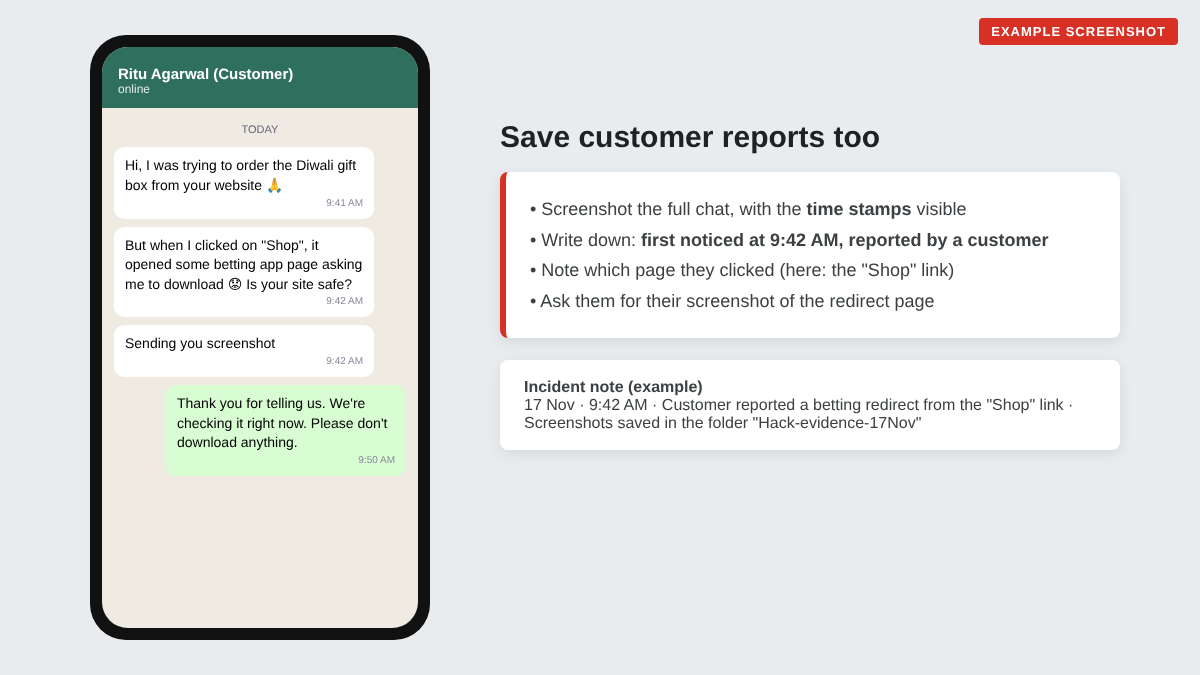
This helps ensure your customers’ security and prevents Google from receiving more spam pages.
Assume the hacker is aware of all your website’s passwords. Replace them all, using a trusted device.
Also, update the security keys (salts) in wp-config.php on WordPress. This will log out all users, including the hacker.
Your hosting support team can see server data you can’t, and they deal with hacked sites every week. Call or WhatsApp them and:
In case you are using our Hosting Services, our support team is available 24×7 on call for server monitoring and WhatsApp to help with this step.
Hackers seldom leave a single bad file. Most have a hidden ‘backdoor’ that can be accessed to get back in, so you must locate all of these.
The warning doesn’t disappear the day you clean up. You must tell Google it’s fixed.
Google usually replies within a few days; spam hacks can take a couple of weeks. If the review is rejected, Google tells you what it still found. Fix it and ask again.
Most guides on hacked websites are written for the US or UK, so they skip this part. In India, a hacked business website can come with a few duties of its own. Check these the same day.
| Who to inform |
When |
Applies if |
| CERT-In (Indian Computer Emergency Response Team) | Within 6 hours of noticing the hack | You run a business: a company, firm or sole proprietorship. Website defacement and intrusion into a website are on CERT-In’s list of reportable incidents |
| National Cyber Crime Reporting Portal or helpline 1930 | Immediately | Money was stolen, or customers were cheated through your site |
| Your payment gateway (Razorpay, PayU, CCAvenue and others) | Immediately | Your checkout or payment pages were changed |
This is general information, not legal advice. If you’re not sure whether a rule applies to your business, check with your CA or a lawyer.
If customers may have seen spam, a virus warning or a fake payment page, tell them before they hear it from someone else. A short WhatsApp or email message is enough:
We have recently identified a security issue on our website and temporarily closed it due to the issue. The site is now fenced, safe and secure to use. If you did receive any strange message or payment request that seems to be sent from us from the date disregard and reach out to us via phone. We’re sorry for the trouble.
Most small business websites in India get hacked through the same few gaps. Close these and you’re far safer than most.
Need help right now? Call or WhatsApp HostPlanet’s 24×7 support team. We can check your account, restore a backup, and set up SiteLock and automatic backups so it doesn’t happen again.
1. Website hacked: what should I do first?
Save screenshots and place the site under maintenance. Then, then change every password from a trusted device before you start cleaning, before you begin cleaning anything.
2. How do I know if my website has been hacked?
Be alert for redirects to betting and spam sites, weird pages in Google, a warning from your hosting provider, or a “This site may be hacked” warning. Most spam pages are visible with a Google search of the site:yourdomain.in.
3. Is hacked website recovery always possible?
Almost always, yes. The fastest way is to restore a clean backup from before the hack. Without a backup it takes longer, because the infected files have to be found and removed by hand.
4. Will a hack affect my Google ranking?
It can. Google may show a warning, drop the spam pages or show a red “Dangerous site” screen. Rankings usually come back once the site is clean and Google approves your review.
5. How long does it take to fix a hacked website?
Restoring a clean backup can take under an hour. It can take a day or more to manually remove it, and it takes days to two weeks for Google’s review of the warning.
6. Why would anyone hack a small business website?
It’s rarely personal. Many attacks are bots that probe lakhs of websites for outdated plugins and weak passwords. There was a space in your site that the bot found.
7. Do I have to report a website hack in India?
Yes, for businesses. CERT-In’s April 2022 directions say website defacement and intrusion must be reported within 6 hours of noticing them. If money was lost, also report it on cybercrime.gov.in or call 1930.